Loading...
 ClipTrendClipTrend
Loading...
277 credits·Buy more
I Just Join The Trend About New AI Seedance 2.0 #aitrend #ai #transform
Open original ↗More viral originals
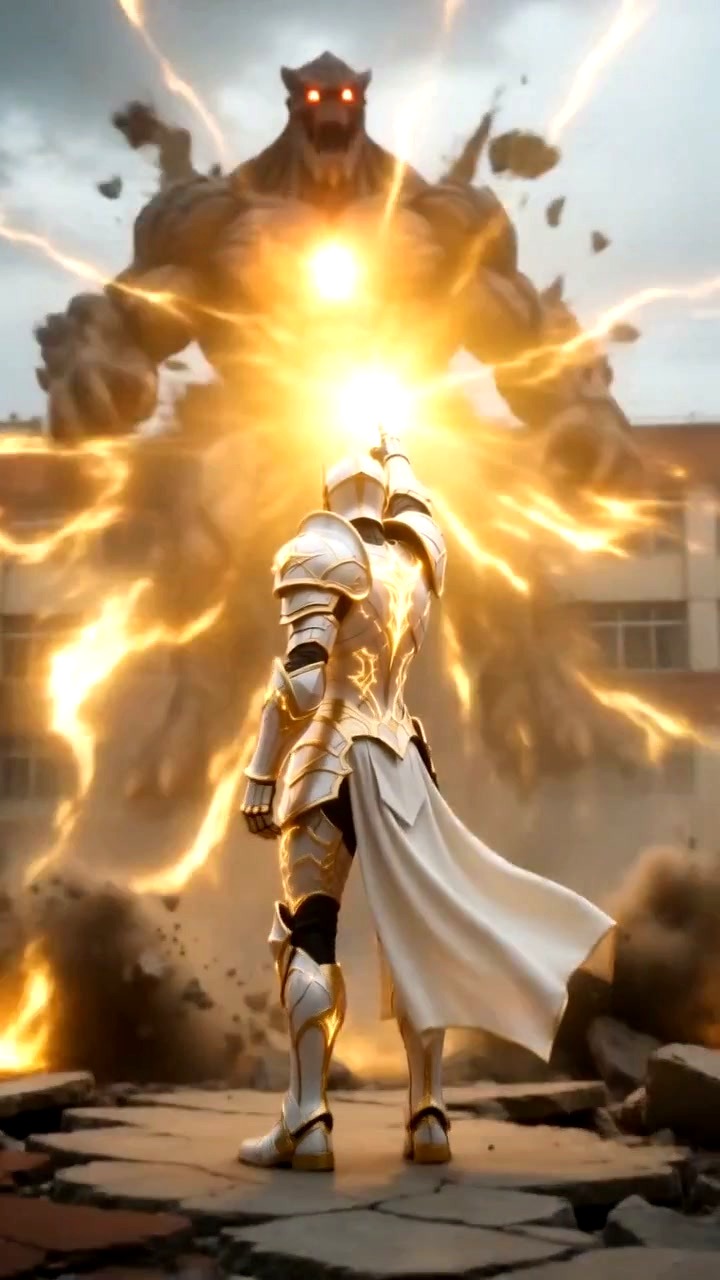
AI Apocalypse Warrior Video is ClipTrend's AI transformation video generator for the viral TikTok apocalypse-transform trend. Upload a portrait face photo, click Inspire Prompt to get a fresh warrior theme (ice empress, jade guardian, cosmic pharaoh, coral bio-golem, aurora iridescent warrior), or type your own armor / creature / deity form specifying material, color palette, signature weapon, and aesthetic vibe. Press Generate and the AI apocalypse transformation video generator renders a cinematic 9:16 clip in about 90–120 seconds — face-to-armored-warrior transformation, dramatic post-apocalyptic lighting, particle effects, and a dystopian wasteland setting — with your face identity preserved across every scene. The trend has already pulled 18.5M+ combined views across @itsaboutai1 references, including a 2.8M-view Seedance 2.0 trend join and the 583K-view Shadow Knight transformation. Creators use the template to ride the viral apocalypse-transform wave with a reliable one-click workflow, produce cinematic warrior portraits for gaming and fantasy channels, and build series content with varied apocalyptic themes (frost empress one week, cosmic pharaoh the next). The Inspire Prompt actively enforces color-palette variety — ice-blue crystal, jade green, white-gold divine, cherry blossom, aurora iridescent, coral reef, amber clockwork — so your series does not look like seven dark-shadow knights in a row. Where traditional editing treats warrior armor as a compositing problem, this is pure ai transformation — a single-pass multimodal pipeline that generates armor, wasteland, lighting, and particles together while locking your face identity. That is the core ai transformation advantage: you go from ai face to apocalypse warrior in one Generate click, no rotoscoping, no masking, no 3D rig. The resulting ai face to apocalypse warrior render drops straight into TikTok or Reels, with the same post-apocalyptic cinematography used by the top reference creators.
Generate an apocalypse warrior ai video in 60 seconds with ClipTrend's ai apocalypse transformation video generator — cinematic post-apocalyptic face-to-warrior transformation, no watermark.
AI Apocalypse Transformation Video — Apocalypse Warrior AI Video
Upload a portrait face photo (clear, front-facing, good lighting) via the drop-zone on the left panel — the AI apocalypse warrior video generator works best with a neutral expression and visible face features.
Click Inspire Prompt to have a creative-idea AI suggest a transformation theme with a varied color palette — the Inspire AI actively explores bright / unusual combinations (ice-blue crystal, jade-green nature, cherry-blossom pink, aurora iridescent, coral reef, amber clockwork) rather than defaulting to dark / shadow / obsidian.
Alternatively, type your own warrior theme description specifying armor / creature / deity form, material, color palette, signature weapon or feature, and overall aesthetic vibe.
Review the auto-configured cinematic defaults (dramatic lighting, dynamic camera motion, particle effects, 9:16 vertical framing) — these are pre-set for the apocalypse warrior aesthetic.
Click Generate; the AI apocalypse warrior video renders cinematically in about 90–120 seconds on ClipTrend's GPU queue with a live Queued → Generating → Complete status pill — this is the single step that takes you from ai face to apocalypse warrior, so preview the transformation before export.
Tap any question to expand.
They describe the same ClipTrend workflow from two angles. The ai apocalypse transformation video framing emphasises the effect itself — a cinematic face-to-warrior transformation set in a post-apocalyptic wasteland with dramatic lighting, particle effects, and 9:16 vertical framing. The apocalypse warrior ai video framing emphasises the output — a viral-ready warrior portrait clip, face identity preserved, armor/creature/deity form applied, ready to post on TikTok or Reels. One Generate run produces both at once, so whichever search phrase you land on, Apocalypse Transform is the template that ships it.
ClipTrend's Apocalypse Transform is the tuned AI transformation video generator for this specific TikTok trend. Open the template, upload a clear face photo, click Inspire Prompt for a creative theme (or type your own), and press Generate. The pipeline handles the rest — face-to-armored-warrior transformation, cinematic lighting, atmospheric effects, and.
Preview the 9:16 vertical MP4 in the right panel, regenerate for a different transformation theme with the same face, and download to post with the caption "I became an apocalypse warrior with AI" on TikTok, Reels, or YouTube Shorts.
ClipTrend's Apocalypse Transform is the tuned option for this specific TikTok trend — the Inspire Prompt with varied-palette enforcement plus Seedance 2.0-style cinematic rendering produces more on-trend output than generic AI video tools. Generic models (Veo 3.1, Kling 3.0, Pika, Runway) can approximate the look with enough prompt engineering, but without the.
Yes — the template builds a cinematic warrior character around your face and sets it in an appropriate environment with dramatic lighting, particle effects, and atmospheric framing. The pipeline handles face identity preservation, armor / creature form application, environment generation, and cinematic camera work automatically.
Creators upload a face photo to an AI model (Seedance 2.0 or equivalent multimodal video model) that applies armor / warrior styling in a cinematic apocalyptic setting. The viral trend was largely driven by Seedance 2.0's release in early 2026, with @itsaboutai1 and @bgyufpzr50 reference creators anchoring the aesthetic.
Yes — ClipTrend is pay-as-you-go. A Starter credit pack for $11.99 lets you test the Apocalypse Transform template across multiple apocalypse warrior videos, at around 277 credits each at current pricing. No subscription required, no paywall on Generate, no forced watermark on paid exports. For creators running a daily apocalypse-transform content series.
AI face-to-warrior models have a strong tendency to default to dark-shadow-obsidian themes when given open prompts — every render looks similar if you don't actively enforce variety. ClipTrend's Inspire Prompt explicitly requires color-palette variation (ice-blue crystal, jade-green nature, white-gold divine, cherry-blossom pink, aurora iridescent, coral reef, amber clockwork) so a.
Type "massive animated explosion behind the warrior on the wasteland ridge" (or any variant) into the theme field and the Seedance 2.0 pipeline will slot a cinematic animated explosion into the apocalyptic backdrop — shockwave, fire plume, flying debris, and camera shake all rendered in-frame as a single animated explosion pass. No compositing or extra editor needed; the animated explosion lands on the same 9:16 clip as your face-to-warrior transformation.
You don't need a green screen explosion plate with this template. The AI apocalypse warrior video generator renders the explosion directly into the cinematic post-apocalyptic environment, so there is no chroma-key step, no rotoscoping, and no layer-merge in an NLE. If you still want that green screen explosion look for compositing elsewhere, describe "bright green backdrop with explosion" in the prompt and the pipeline will honor it.
Yes — add "disintegration effect" to your warrior theme (for example "apocalyptic empress with iridescent armor dissolving into ember particles") and the pipeline layers a cinematic disintegration effect over the transformation. Perfect for the "warrior emerges from collapsing armor" or "hero vanishes into ash" narrative beats that viral apocalypse-transform creators use as closers. The disintegration effect reads cleanly against the post-apocalyptic backdrop without extra VFX passes.
Yes — Apocalypse Transform is a full post apocalyptic ai video generator tuned for the ai face to apocalypse warrior transformation. Upload one portrait, pick or auto-generate a warrior theme, and the cinematic multi-scene pipeline turns your face into a post-apocalyptic armored warrior in a dystopian wasteland — all while preserving face identity from the opening transformation through the mid-clip action to the closing hero-pose frame.
The ai face to apocalypse warrior workflow is four short steps: (1) drop a clear portrait into the upload zone on the left panel; (2) click Inspire Prompt or type your own warrior theme (armor + color palette + signature weapon); (3) press Generate and wait ~90–120s; (4) preview the 9:16 clip and download. The Seedance 2.0-style pipeline handles the identity lock, armor build, wasteland environment, and cinematic lighting in one pass — you never leave the template to rig, mask, or composite.
Traditional VFX treats this as a multi-track editing job — plate, matte, rotoscope, 3D armor rig, environment composite. AI transformation collapses that entire stack into a single multimodal Generate call: one upload, one prompt, one clip out. For the apocalypse-transform trend specifically, AI transformation is the only practical path for solo creators because each warrior variant (ice empress, cosmic pharaoh, coral bio-golem) would otherwise need a bespoke armor rig. With AI transformation the same face can ship a new warrior per day while keeping identity consistency across the series.